
Custom Sort Order Within a DAX Measure

This post will answer how to sort a measure that returns text values to a custom order, without affecting other columns. It will utilize the DAX functions of REPT() and UNICHAR(8203) – a Zero width space.
The requirements
I’ve been working at a florist! In this example, I have been in charge of looking after four plants, named A, B, C and D. The florist owner is a big Power BI fan, and asked me to measure how much water I have been giving them a day to put in a report. They need at least 20ml to survive, but over 50ml will stop them growing as well.
Create a table with the flowing:
The flowers get under 20 ml, label as Bad.
When the flowers get 20 – 50 ml, label as Good.
Finally, if the flowers receive over 50 ml, label as Warning.
I’ve been asked to show them in order of Bad, Warning then Good. This is vital so the plants needing attention are at the top of the table.
Creating the table
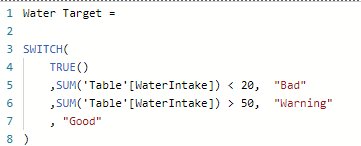
Here is the measure I create:
Adding this to a table:
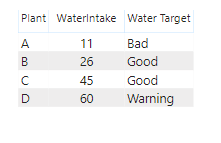
Now comes the question, how can I order this to put Bad and Warning together? If I order by Water Target measure, this will be alphabetical. Sorting by WaterIntake can not give me the correct order either.
One option would be to make a conditional column and use the “Sort by Column”. However, this may be a complicated calculation, especially on more complex measures. In addition it will sort every visual by this column, when I only want to sort in this one table.
Creating the custom sort
My solution? Make use of the UNICHAR() function. For those unaware of this function, UNICHAR() can return characters based on their UNICODE number. This can include more text characters not included on the standard keyboard.
A character that can help is UNICHAR(8203). This is a “Zero width space”. This is a space that has not width, so it is essentially invisible and will not be visible in the measure. The Zero width space is still recognized as a character by DAX. Spaces come before any letter in the alphabet. Two spaces comes before one, and so on.
The second function I will utilize is REPT(). REPT() or replicate, simply repeats text multiple times. It takes two arguments, the text and the times to repeat.
For example: REPT( “Hi”, 3 ) will return the text “HiHiHi”
To change the sort order, I will repeat the Zero width space in front of the text. The text I want to appear first will have the space repeated the most amount of times. This will put it first in an alphabetical list. I will use the & symbol to concatenate the Zero width spaces and the text.
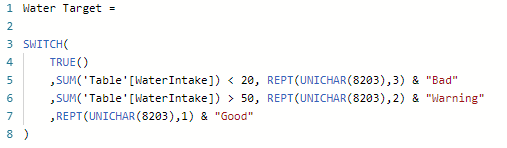
Now, “Bad” has the Zero width space repeated three times in front of it. This now puts it first in an alphabetical list. Warning has the Zero width space repeated twice, putting it second. “Good” has it once putting it third.
Applying the sort
Now I can arrange my table by Water Target (alphabetical), in an ascending order:
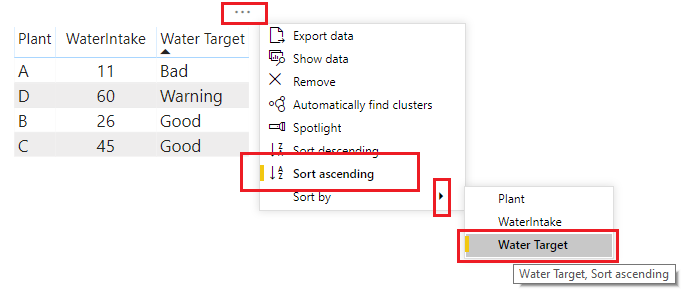
And success! I’ve added a custom sort to my text measure, without making any other measures or columns.