Customize the Default Dataset

In the October 2020 release of Power BI desktop you have the ability to load a dataset from the splash page. For this tutorial we dig in on how Microsoft enables a default dataset. Additionally we show you how to customize the default dataset for your needs.
Quite often I need to prototype a visual, or work on some sample data to design a report. The very first step is always loading some sample data. Now that Power BI desktop comes with a default dataset, we leverage this feature to speed up our development process.
Watch the YouTube Video
Additional Thoughts
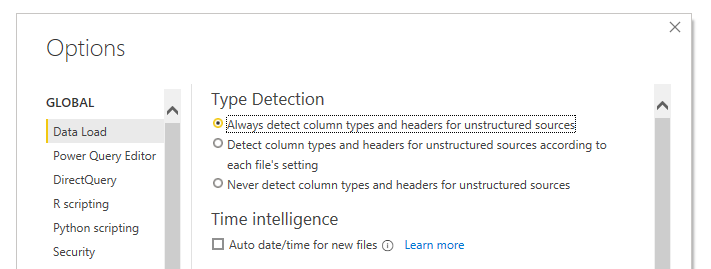
In this video I explain that the dataset does not auto load with datatypes enabled. This was due to my default setting within Power BI desktop. If you’d like you can make Power BI Desktop auto detect your datatypes for you.
This setting can be changed by the following steps:
- Click on the File button
- In the drop down menu, Click on the Options and Settings
- In the menu on the right Click the button labeled Options
- Under the Global section in the Options menu Select the item labeled Data Load
- Change the Type Detection for loading data