
PowerBI.tips

Dual Y-Axis Line Chart
September 11, 2019 By Mike Carlo
Dual Y-Axis Line Chart

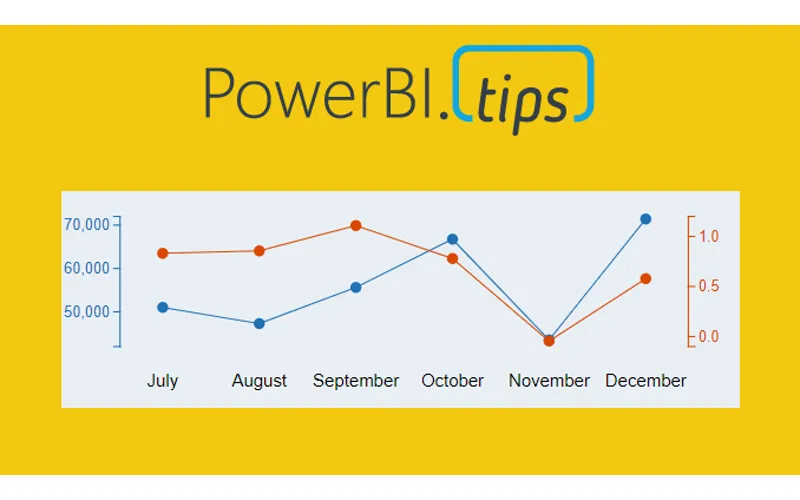
Ever need two different scales on the Y-Axis of a line chart? If so, then this tutorial is for you. While creating a dual y-axis line chart is pretty common in excel, it is not as easy in power BI. The only standard chart that comes with Power BI Desktop that enables dual y-axis is the Column and line combo chart types.

For this particular visual I needed to show correlation between two time series with different Y-axis scales. The Y-axis on the left of the chart had data elements in the thousands, but the right side needed percentages. The tutorial below illustrates how to accomplish by building a custom visual using the Charts.PowerBI.Tips tool.

Video Tutorial

note: there are a bunch of really good custom visuals that can be downloaded from the Microsoft App Source store. However, this article will not review all third party visuals that are able to produce a dual Y-axis line chart.

Source files

All files used to create this visual are located here on GitHub.

Layout file

The file used in this tutorial was a derivation of the Sunset layout from PowerBI.Tips. If you like this file, you can download it here:

Previous

Power BI Refresh Overview

More Posts

Jun 10, 2026

Microsoft Build Recap – Ep.535

Mike and Tommy recap Microsoft Build 2026 through a Power BI and Fabric lens, focusing on the announcements that matter most for report builders, semantic models, and agent-driven app development. They unpack why Rayfin, Replit integration, OneLake, and new Fabric skills signal a shift from asking AI for answers toward using agents to create real production artifacts.

Jun 5, 2026

CI/CD Automation with Agents – Ep.534

Mike and Tommy explore how agents can simplify CI/CD in Fabric by helping teams work through Git workflows, merge conflicts, validation, and deployment automation. They also compare deployment pipelines with Git-based approaches and explain why small, testable automations are the safest way to start.

Jun 3, 2026

Claude Design & Power BI Embedded – Ep.533

Mike and Tommy explore how Claude Design, agentic workflows, and HTML wireframes could reshape report prototyping for Power BI teams. They also debate where today’s tooling still falls short, especially for Power BI Desktop users who need practical ways to turn context, design ideas, and embedded experiences into working reports.