
Filter Context Explained – Ep. 378
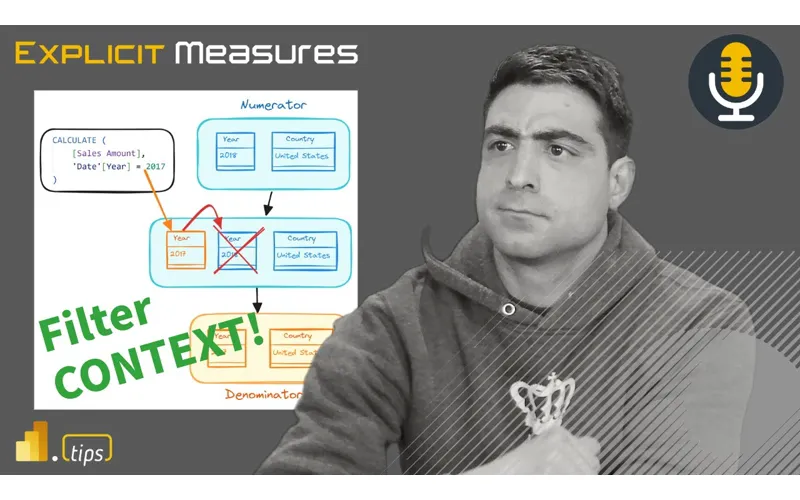
Mike, Tommy, and Seth break down filter context in DAX—what it is, how it’s created, and why it’s the root of so many “my measure is wrong” moments. They walk through practical mental models for reading a visual’s filters and using CALCULATE intentionally, so you can predict results instead of trial-and-error debugging.
News & Announcements
-
Data Factory Announcements at Ignite 2024 Recap — A roundup of Fabric Data Factory updates announced around Ignite, including integration improvements and new capabilities aimed at making pipelines and data movement easier to manage at scale.
-
Announcing Python Notebook in Preview — Microsoft introduces Python Notebooks in Fabric (preview), targeting BI developers and data scientists who want a lightweight notebook workflow for Python-first analysis without spinning up a heavy environment.
-
Accelerate app innovation with an AI-powered data platform — A Microsoft Fabric overview framing how the platform ties together data engineering, BI, and AI experiences end-to-end, with emphasis on faster iteration and a unified data foundation.
-
Filter context in DAX explained visually (SQLBI) — A visual-first explanation of how filters from visuals, slicers, and page/report filters combine into filter context—great companion reading if you’re trying to reason about a measure before you write it.
-
Got an idea or topic for a future episode? — Drop your mailbag questions and topic ideas for future episodes.
-
Subscribe / listen to the Explicit Measures Podcast — The home base for the show, including where to listen and how to catch episodes live.
-
Join Tips+ (Theme Generator) — The Power BI Theme Generator experience from PowerBI.tips for creating consistent report styling.
Main Discussion: Filter Context (and why it’s the DAX superpower)
If there’s one concept that unlocks “I can write measures” → “I can explain measures,” it’s filter context.
In this episode, Mike, Tommy, and Seth focus on the practical side of the concept:
- Where filter context actually comes from (visual axes, slicers, page filters, report filters, and relationships).
- Why the same measure can return different numbers depending on where it’s evaluated.
- How
CALCULATEchanges the evaluation by adding/removing/replacing filters—and why understanding the before/after filter context matters.
A useful mental model: list the active filters first
Rather than jumping straight to DAX edits, they recommend pausing and asking:
- What columns are on the visual?
- What slicers are applied?
- What page/report filters are active?
- What relationships propagate those filters to the fact table(s)?
Once you can name the filter context, you can usually predict whether a measure should behave “as expected.”
Why this matters in real projects
A lot of DAX issues aren’t “bad math”—they’re a mismatch between:
- the grain you think you’re evaluating at, and
- the grain your measure is actually being evaluated at.
Understanding filter context is the quickest way to stop debugging by superstition (adding/removing random functions) and start debugging by cause.
Looking Forward
If you want to level up fast, take one of your commonly-used measures and try explaining it in plain English as:
- what the base aggregation is, and
- what filters must be active for it to produce the intended result.
That single habit tends to make your DAX cleaner, your models easier to reason about, and your reports more trustworthy.
Episode Transcript
0:32 welcome back to the explicit meters podcast with Tommy Seth and Mike good morning everyone how’s it going good morning gentlemen oh welcome back it’s been a while since we’ve been live on air this is a little early today so we have some people got meetings we got things to do work to happen so we pushed this podcast a little bit earlier in the morning so apologize for those of who are starting at you have to catch up a little bit on double time until we get there but today’s episode let’s just do a quick introduction of what we’re doing today today’s episode is around filter context
1:04 today’s episode is around filter context explain an article that came out from sqlbi talking about visual or filter context explained visually so doing some images and diagrams and showing how the tax works really good article very excited to jump into it and unpack this article but we can finally officially talk about Microsoft ignite because we’re actually live after the actual event so it was amazing Tommy didn’t do anything dangerous as you may have heard on PR previous episodes we didn’t get lost but it was a it was a really good
1:34 lost but it was a it was a really good event it was a huge event I didn’t realize how large this be yeah man I had so much fun at Microsoft ignite they did a great job I think what was the number 10, 000 people that were actually attending 10, 000 attendees I’ve never been to build before are they typically this big death I don’t know ignite sorry ignite don’t know never been did say that when they went in Orlando the largest they had was 22, 000 wow that’s huge Orlando
2:07 22, 000 wow that’s huge Orlando interesting okay well Atlant is pretty big they’ve got some PR conference ERS down there I’ve been down to some pretty large events down there very interesting it was just really nice having it in my backyard like I just did the whole city thing like I took the Metra in and then I took those divvy bikes rode through the city while jaming out to Billy Joel to get to the conference center was probably the best time I had freezing your butt off yeah one day a little cold we had like an inch of snow one morning when we woke up it was it came through pretty quick
2:37 up it was it came through pretty quick and and dropped some snow I will say this conference for us as powerbi people it’s been a long time since you felt there was so much dedicated to the data platform and you see too where they had basically these Health booths for all the Microsoft products the business applications teams a azure this really cool server setting for Hardware but the data space was taken up
3:07 Hardware but the data space was taken up a good amount of room and I think we’re seeing that’s because of fabric it’s not just us doing little powerbi reporting it’s like oh well now we actually kind it’s like oh well now we actually touch all of these items so that of touch all of these items so that was was awesome this this there was two main messages I feel like I heard a lot at this conference one of the main messages was everything is AI something another there’s everything was built with co-pilot in mind building your own co-pilot there’s a lot of training and help around how to better prompt a
3:38 help around how to better prompt a co-pilot to get what you want out of it they had these little cards that they handed out that was really interesting giving you like here’s four sections of how you should prompt things this is what you should be doing explained a lot about what is a co-pilot agent how do those work so I I was very interested in then a lot of this and trying to figure out how do you integrate this with your business and in talking with people there at the conference people are starting to really I guess change how they do their work by you utilizing and leveraging AI
4:08 work by you utilizing and leveraging AI I I think I just read an article from I don’t remember what the company was but the company was using AI to do all of their sales and marketing materials and they were saying that the AI generated images of their products and the messaging that was going with it across social media was actually more interactive engaging had better engagement than just standard hiring an agency to do that and they were saving millions of dollars a year in advertising because the AI could just
4:38 advertising because the AI could just generate a lot of these things faster without paying someone someone looks at it approves it pushes it out and then they can just watch the metric come back on it and it comes back better they customized it for Regions they customized it like you could have it rewrite the language for different countries and and really cater the experience to what would resonate with that audience which is very interesting to me so anyways really cool stuff a lot of AI things there and Tommy I would agree to you every all the announcements that came out of ignite was really around fabric not
5:08 really around fabric not necessarily out of powerbi what was the were there any announcements powerbi related it was all fabric stuff really yeah usually they have some little demo of what they’re working on with with powerbi there there was nothing a little tiny bit like like the really what powerbi is now is just a cog in the machine there was some really interesting things there was the the very last and this is when you’re at the end of the conference the very last day Kim Manis and mo came up and did
5:40 Manis and mo came up and did what’s going on with poweri what’s happening in the future power some really good things announced that were there they’re talking about the timle editor huge news there that’s going to be really big we’ve done a YouTube video on that one already using timle inside vs Visual Studio code awesome tool really like it Tindle is going to change how we build things so there’s a lot of really rich features coming down the pipe that are going to make things really really exciting anyways any other announcement there’s actually a an article here
6:10 there’s actually a an article here there’s an entire ignite recap so the entire ignite recap is here as well so we’ll put that out there as additionally in the chat for you who want to check it out all the major announcements yeah there’s there were so many announcements that they were coming up with but I think we will probably be spending episodes devoted to a lot of the main features I think we always I really love what iRun does after any big conference is here’s a
6:40 after any big conference is here’s a major blog article we’re going to cover the high level of what we’re working on in the major products and there’s really three major themes that we introduced at ignite for fabric we we have the first one is the databases which we’ve talked about before we actually were able to do a live reaction video which was so fun at ignite but man that’s crazy that how many places we can store data the next one is
7:13 places we can store data the next one is the was it no workloads was your thing workloads is workloads is out so workloads workloads is a fabric thing that lets you do things with data and elements inside Microsoft there’s not many workloads out right now but we we have an workload out par tips just released a power designer which is a a workload that releases a full ability to edit or modify your theme files right inside fabric which is a neat tool I think a lot of other tools will start taking advantage of this as well
7:43 start taking advantage of this as well I’d like to see more tools come out there which would be very helpful to drive adoption either of fabric and or making your powerbi creation stuff easier there was some other announcements Tommy you said the SQL database was like the really major announcement for fabric I think that was like the highlight of for a lot of people so yeah the fabric databases it’s it’s a full-fledged SQL database there’s no it’s not
8:09 database there’s no it’s not a diet or Junior version of a normal SQL database that you would spin up in Azure or however else in terms of member roles being able to query it I was already testing creating a database and using it in a power app it behaves and acts just like a normal database but it’s so easy to spin up you this is along with the ability to also mirror databases as well which usually had some limitations depend depending on what database you’re
8:39 depend depending on what database you’re coming from but this we can get the data in we can pull in from pipelines right now or from data flows gen two okay all right Tommy give give me a so okay I’ll be honest on the podcast I’ve been harping a little bit on data flows Gen 2 CU it just hasn’t quite kept up with what I think we we need as developers to build and create things moving forward Tommy I feel like you’ve had an experience here with data flows Gen 2 you’ve been very Pro Data FL Gen 2 is the way to go it’s it it’s
9:09 is the way to go it’s it it’s fine it’s it’s good to go and I still had a couple qualms there Tommy I think you’ve had a recent friction point for you in data flows Gen 2 so here I don’t want to say here’s my problem but they’re coming out with a ton of Articles to touring the query editor and SQL database and documentation on these new fabric databases and that’s great that’s awesome the trouble is not all those features yet are available or work in in prev I know but it’s not only in preview it’s not even out in preview yet
9:41 preview it’s not even out in preview yet or like for all tenants so for example it’s basically all right just there it’s a new custom fabric database connector to say where you want to push your data to that does not exist in my tenant it’s just a normal SQL database I was like okay I’ll just put in the query string we’ll be good to go okay well as soon as I did that basically I think Mike T is like you’re not ready for this yet so we’re just G to bug out so yeah there some substantial bugs going between data flows Gen 2 into the new fabric SQL
10:13 flows Gen 2 into the new fabric SQL database is that what you’re saying window would just say error message try again but I couldn’t exit out of the data flow because there was no publish button anymore so and everything was working until I got to that stage and this also if you’re in the database and you say hey get data from a data flow automatic trouble so there’s some features that they’re talking about that are going to be in preview but are I think they’re so
10:44 be in preview but are I think they’re so excited to get out there that we’re not and this is again this is like any preview feature we’ve talked about right like and this is as cool as this one is are you going to be moving all of your data to a fabric database right now fabric SQL database no yeah so here’s where I’m a little bit torn and I think there needs to be some more communication in the community around where does this SQL database thing fit my imperion is SQL databases are more for transactional information
11:14 are more for transactional information real time in data it lives on top of an app you’re bringing your app data directly to fabric fabric runs your backend now and it automatically mirrors so by default the fabric SQL database mirrors data directly into fabric so it should give you like almost near real time information around hey build your application on top of fabric in addition to doing the data engineering and the reporting outside of it so they’re trying to bring those tools into fabric as well and we were heading we had a an open session with ses I think is his
11:46 an open session with ses I think is his name he was talking sures is the one who owns he’s the VP of the databases inside fabric I guess and he was talking about we’re starting with SQL and he alluded to other databases that Microsoft owns phones like Cosmos and potentially postgress I don’t think he mentioned my SQL particularly but there’s other database systems that could be potentially brought directly into fabric as a a native application or native tool which is really interesting my opinion most of what I do
12:17 interesting my opinion most of what I do is on the data engineering side and it’s not so much transactional processing app building so I think we’re adding a new role into the fabric ecosystem I think the SQL DBA didn’t really know where they fit honestly you bring out fabric you’re like we have all this fabric stuff the SQL DB is like what do I do I got to learn notebooks now and move that direction and so I think what we’re seeing now is now that there’s a SQL Server here directly I think a lot of companies are going to feel comfortable moving directly into that
12:47 comfortable moving directly into that and starting with the SQL database directly inside fabric do you do you guys feel that shift though here like what’s interesting to me is like up to this point fabric is the analytics plat form yes and and now we’re suggesting that we put production transactional databases that are supporting applications and things like that into the same the same ecosystem this is my so you’re right and I think I’m feeling a shift Microsoft is throwing like everything in the kitchen
13:18 throwing like everything in the kitchen sink Outside Inside fabric now like this is this is the tool so does it make sense for us to give us a lot of non so let let me just tease out your idea a little bit cuz I like where you’re going with this one there’s a shift of happening where we want to not only use fabric as the analytical engine but we also want to use it as the operational data engine for everything I’m not sure if I’m buying into that quite yet I need to see some more results again it’s just coming out in preview so we this out a bit
13:48 in preview so we this out a bit more the followup to that is as they’re announcing this and the capabilities is it is it the full like when when you start going that route it’s re like it’s B really important in my experience to have absolute control over everything about that sequel indexing columns all the the back have back have that right and then like the other part of this is like question the other part of this is okay so now now I’m paying for that via the like the the
14:20 for that via the like the the fq which is a generalized skew not specifically for the service I’m spooling up like it I’m not it’s an interesting thought I’ll have to ruminate on it a little bit more but at the same time like when when you’re building production systems that are transactional backends for applications you’re you’re talking about the the engineering people right it’s not the oh
14:50 engineering people right it’s not the oh I don’t know how to spool up a SQL instance I in Azure and I don’t know like I need the quick button that lets me do that that right like they’re they’re the ones that are going to want absolute control around costs expenses like manipulating the machines and how they work with the application etc etc yep and that’s where I have lots of questions I guess so and what happens when you run out like if you have your production server running and your fabric screw runs out of capacity does
15:21 fabric screw runs out of capacity does it throttle you how does that work like does it take down your production environment or slow it down just because of that one little thing do you stand up a workspace with just your your databases now I suppose that’s the option right that’s probably the alternative to isolate that a like so what happens when Tommy runs this incredible AI generated notebook thing and it just Hogs all the cus what what happens now like what do we do with the SQL database so I I just there’s a your point Seth is very well taken and I think there’s a lot of
15:51 well taken and I think there’s a lot of unpacking that needs to happen here like how much control do we get how much of this being automated by Microsoft in other tools that we brought into fabric Microsoft has given us like some knobs but not all the knobs right even if I think about spark like you get like some of the knobs and they’re now getting to the point where there’s a lot more control around spark you can do a lot more with it today and we’re getting new things I think something was just announced on Twitter the python notebook
16:16 announced on Twitter the python notebook now appears inside spark or the The Notebook experiences which is not Spark It’s python it’s pure python really cool I need to try that out I heard it very fast and super performant so interesting as well question here I thought we’re using obviously py spark in in already what’s the difference here with just using python it’s not the Spark engine this is just pure python running it’s running I believe my understanding is the python is running on a single
16:46 is the python is running on a single node cluster I don’t think it scales out it’s multi-threaded but it’s not multimachine spark uses a worker node and multiple nodes that’s what I was gathering about the difference between two so I I don’t know to be honest I don’t know too much about the new python notebooks but I’ve seen a couple people doing some testing on some moving of large data things and they’re saying it’s much faster because there’s less overhead on the back end incredible like now we have more options but this is this is not adding this is not making it easier for people to decide things
17:17 it easier for people to decide things right this is just making this is just making it a whole lot harder to figure out what’s going on like which one of these things should I use to best optimize which is good means we have options but on the other hand it’s like do we have too many options yet I think this is what we’re running into and I I I cannot wait to spend the spend the next many episodes talking about the the choices here that being said at least from the database side I’m really happy with just the
17:47 side I’m really happy with just the experience because it’s not going to be for we’re moving our entire processes and what a company usually has in a databased of fabric but do how many times that’s not that’s not what they say it’s not the intent though you’re saying that but that’s not like you read the main article and they’re like no now you can add everything in here yep I know I like I’m poo pooing a little bit but at the same time like the reverse of that is it’s extreme like sql’s been around for forever in a day it is extremely easy to access that data
18:17 it is extremely easy to access that data regardless of where it is however if that’s just another data repository and fabric is now going to be this thing that contains everything if I if I take out the other questions or concerns I have like the fact that the data is in the ecosystem and is just a share away or I don’t need to move it or have another copy of it like yeah that’s compelling right you’re saving money in storage or like everything’s in that same fabric ecosystem and that story still resonates a lot so I just want to
18:48 still resonates a lot so I just want to make that point but Tommy go ahead yeah no I just over the years just this ability if I wish I had this for so many different solutions where we’re trying to get connections is like we’re just going to create some crazy centic model and their SharePoint so this going to save that there also was talk about a new potentially new native visual that was going to allow right back that was another idea here because now that the SQL servers exist right back seems to be getting easier so also very interested around those points like so to your
19:18 around those points like so to your point set maybe maybe it’s not maybe we won’t use it initially full production workloads but I do think it makes sense if you’re going to do like a power app maybe if it can work with power apps and keep that power app data very close to like the data system and potentially you can use powerb to write back some data and get that to update your records and visuals really real time okay all right we’re reducing some friction here it doesn’t need to be so heavy technical anymore and it just works so I’m looking forward to seeing what they come up with that with on that side of
19:48 of things yeah the two other major announcements at least from the among many there’s real-time intelligence is now generally available okay great dude the M they must be getting so many requests from their major clients for real time or or Gartner said look the only way we’re gonna keep you in the lead is time thing okay that’s interesting
20:19 interesting or if you turn on real time you’re you’re you’re their best customer I I think that’s more of I think more of the issue not more of the issue I think more of the item here is you turn on real time it’s a machine on that’s on all the time it’s consistently consuming compute units and I I guarantee you there are some people that are asking there’s there’s a handful of customers that are doing things in real-time fashion that need to have data moving in real time I totally get it there are use cases for it 100% agree there does it need to be reporting for every single thing probably not again
20:50 every single thing probably not again it’s this is our question we always ask ourselves is it a balance between value and cost back and forth yeah so that that it’s a working engine right that I think one of their use cases was an airport has implemented this already for tracking like yeah total sense keep track of the whole ecosystem of not just planes but like what’s going on at an airport heck yeah yep right like amazing that the solution is is making
21:20 that the solution is is making it that easy to get going it’s I have worked with an airline to build reports for them when those planes sit at the at the the gate the gate and it’s just sitting there and they’re not leaving on time you’re talking thousands of dollars like a minute of money we a run ticker like seriously so when things are late things people get angry because there’s so much money invested in getting these people and things and like you miss your second
21:50 and things and like you miss your second flight it’s going to cost a lot of money just to have people rerouted on other it’s just gets really expensive really quick so I could see why air air would make sense for Real Time stuff there’s other a lot of manufacturing things that make sense to be real time production numbers those things I think those also make a lot of sense as well excellent anything else real time anything else we should cover off on I think the last major announcements is which I’ve been using a lot is the one Lake catalog which is replacing that just
22:20 catalog which is replacing that just came out I’m interested to see what your what’s your initial impression on because I heard about it I haven’t had time to play with it so what’s your initial impression on the one L catalog so we had for a while the data Hub and then it changed to the one Lake Hub in powerbi and it just showed like a list of everything which would then just bring you to a new window or new screen which was like the default view if I clicked on Lakehouse I’m in a lak house for glimp semantic model go to that default screen which I didn’t use ever I am now
22:52 ever I am now using and the one Lake catalog combining with if you’re using task flows and T it makes it seamless to find things and easily go through configuration so it’s it’s just a much more organized way and then plus if I’m look at lineage refresh settings see Upstream Downstream there are all these miniature tabs when I click on it so I’m still in the data catalog to be able to see this so I’m really now from an individual
23:23 so I’m really now from an individual point of view so far so good it’s great but I I think if you organize with tabs or tags and I think this experience if I’m a business team or if I’m a team to say hey we need to see all the things that are we’re restoring our data well it also integrates really well with the ideas in task flows what type of action you’re doing so we can filter based on hey prepping data storing data whatever those may be so be great for a team to say okay what is all
23:54 great for a team to say okay what is all that lineage that’s going up to how we’re first getting the data from such and such okay we’ll filter by domain we’ll put that tag and we can easily see those data flows or those notebooks or those pipelines if I want to get a more like report view I again it’s a very seamless experience for depending on the person or audience Persona that you are this is this is them growing up a little bit this is this has been really this is what we need to be seeing right honestly there’s so much getting created
24:23 honestly there’s so much getting created now this is where I think we need to be going this will be fun to to go through what’s what’s specific it called Tommy I’m trying to Google the article on it or the yeah so right now I think there’s only the is it the fabric data catalog is what they’re trying to one Lake catalog one Lake catalog okay that’s the current branding as we have it today okay I’ll just get that and put the link in the chat for people to have you tried it out at all I have not I need to go do some learning on it and
24:54 need to go do some learning on it and then go play with it myself a little bit but I will get the the link here for everyone who else wants to play with it Tommy’s finding some value we’ll check it out as well yeah all right with that we are pretty far in here 25 minutes in let’s get into our main topic today let’s go over to sqlbi and let’s talk a little bit around how do we handle our filter context so Tom you want to kick us off here a little bit and give us some ideas around what is sqlbi going through here and what should we take away from key notes or key important parts of this
25:26 key notes or key important parts of this this article that sqlbi came out with yeah so this is a pretty different take on something that’s very well known well documented what Marco and alberty actually done is actually created visual representations of really how filter context works and all the components of it and it again it’s just I try I I think I’ve seen a few different ways to visually show it but it’s not easy to explain what the filter
25:58 it’s not easy to explain what the filter context is and it’s not easy to explain how it works so I love the visual representations here again it’s not diving into all the components of filter context but basically the high level of adding ignoring or updating the context and a visual representation of that which is a different take for me for I think for us this article hits home because filter context has was that one of those Concepts
26:28 of those Concepts that it was a change in how to comprehend something or think about it rather than like learning a new coding language is I had to change my way of thinking not necessarily had to memorize all of these components and that’s what made it so hard to master so just wanted to revisit that and I guess what are your guys thoughts just re rekindling the filter context FL I think this is an area I would if you’re ever going for a job interview ever
26:59 ever you need to internalize this article for just just well just for power related right okay I think the most when I interview people I ask them what is filter context and people have a hard time articulating what that is and my understanding is it’s so pivotal to everything you write inside Dax it’s how you build visuals it’s how you write the Dax it’s how you look at a matrix and figure out okay why do the rows of data not match the total of the
27:30 rows of data not match the total of the data it’s because there’s some filter contacts being removed it can actually see more data than what is shown on the actual visual so it’s it’s and this is one of the reasons why visual calculations appeared because visual calculations were helping you do things in the visual that made it simpler for your mind to wrap your head around filter context so I I I think this article is something everyone should read you should have a knowledge of what it’s here and be able to explain this be
28:00 it’s here and be able to explain this be willing to explain this to someone else during an interview because if you don’t know this stuff this is going to really impact your ability to do your job well I I think I think I think it’s such a and I agree because anyone using powerbi especially those coming from Excel right have this concept of how data works and this is fundamentally one of those Concepts that you need to ingrain in your head like like why is something happening the way it is that I
28:30 something happening the way it is that I don’t expect right and if if there’s still that all preconceived like this is how it works in thing in tables of information that I’m used to just manipulating or directly touching this thing and not that right like there’s a whole lot more going on right to your point there’s Concepts that you need to understand that are you put together and then see the results as you’re building out calculations within within the tables themselves I guess what’s an interesting early
29:01 I guess what’s an interesting early question from my perspective is how how Tommy you do a lot of training like I don’t know how much you doing these days but how early on are you bringing in this to the conversation oh yeah so really when it comes to the training journey and this actually I love that was that was something I was gonna mention there’s a series of trainings for Dax and especially introducing it actually Shar use some of the stuff actually Mike you created I think for
29:32 actually Mike you created I think for just going through some of the pop quiz things because we have to introduce the basic concepts first about Dex and we talk about model relationships we talk about briefly just about hey if you disconnect a relationship what happens what if you count from another table so very basic things and we showing how it works but it builds up and something that I always share with my people who do training with me is this is a different way of thinking
30:03 is this is a different way of thinking that’s the hard part it’s not because you have to memorize 200 100 functions and and all these different components it’s simply that every model is different which changes your Dex and it’s just thinking like powerbi is so our Advanced Training we don’t talk about functions it’s it’s a really advaned into row context and into evaluation context and again I always there’s no way someone in an hour is going to be able to go through that
30:33 going to be able to go through that but no we introduced that early on but the basics of what a model is in relationships first before you really get into the functions yeah I would say said this is one of the first Concepts I introduced to users is try to identify if I put up a visual on the page let’s identify what is the filter context of the individual data points that we see so this is a very early concept I’m trying to draw forward we may not be going into all the nuances of you going into all the nuances of using the filter pane to adjust a
31:03 know using the filter pane to adjust a measure and filtering things but I do try to get people to to mentally think about this as this is pivotal because a lot of times what I feel like the pattern is is you build some measures you build a visual don’t quite get what you want and you go back and you remodel some data either you shape you change the shape of the data so it better fits the visual or you add new measures to get the output that you want so I always talk about it it’s like a seesaw right you spend some time doing the measure building and then you spend some time visual building
31:34 then you spend some time visual building and Report building and then you go back and say you make some changes you kind and say you make some changes you teeter totter back and forth between of teeter totter back and forth between measures and then making reports and more measures and model changes and going back and forth but filter context is so key that this is an early concept that we adjust and we talk about very early in our process that answer your question it did how where do you think it fits do you think this is like a a core a core element here or do you think this is fitting would you yeah I I think I think you have to hit the
32:04 mean I think I think you have to hit the foundations underneath it first right like all the all of the what you just described like how do you build a model what are the relationships between you what are the relationships between the tables hopefully their facts know the tables hopefully their facts and dimensions right like how complex is the model versus a simple model right and what does that do for some of the the functions that you’re building related to even understanding filter context and the the different ways we can manipulate and I
32:31 different ways we can manipulate and I think that’s that’s ultimately the the value in here is not necessarily just saying hey what I’m presenting is right or wrong right or I don’t understand it it’s I’m given the constructs of a bunch of decisions are leading up to this point how do I manipulate this function to produce the results that I want because there is a ton of of flexibility in Dax that allows us to and what I love about the article here is walks into those areas where if you if you’re
33:01 those areas where if you if you’re grasping this idea of filter context how do we manipulate that context right like I can do that specifically in these areas with such a with with the the Dax language but it’s where you don’t have the fundamentals down where I think people start tripping like going back and forth between the ways you can manipulate things not understanding how to manipulate like what they’re doing yes right where it’s it’s I think the challenge being
33:33 it’s it’s I think the challenge being people who are new to Dax are instantly going to communi or sites for the specific answer right and then seen seen responses or seen answers to other questions that are just slightly different but they don’t understand that slight difference in a lot of context it’s like it’s that one part of the calculate statement that is switching the filter cont text that they don’t get right and they would need to so it that’s the Nuance I think and and even
34:04 that’s the Nuance I think and and even someone who like learns D learn AXS right like those are the like it’s a it’s very it can be very straightforward and simple but the the the Nuance of understanding each line is extremely important and and this concept of filter context drives all that so and I I will never forget for me when just getting into powerbi and really
34:35 just getting into powerbi and really want to take the next step my wife used to work on Saturdays so I basically told him like I don’t care what you do after work and I I just got the definite guide to Dax book and I probably spent hours just going over the two chapters or three chapters and calculated in that evaluation context because again it’s this is not something where it’s like with power query it’s like oh there’s just it’s pretty straightforward here’s all the things you can do within that’s how you master it this is simply you can read it
35:08 it this is simply you can read it you go okay but until you’re actually applying it and really thinking how powerbi is thinking one of the things I always say in training is I’m going to refrain from saying that whatever you are going to see that the demos that we do I’m going to refrain from saying that’s wrong a better way to say is that’s not our desired output because according to what we did we’re doing we’re getting returned exactly what we asked basically we just don’t know what we’re asking for so even when you have
35:40 we’re asking for so even when you have those repeating numbers basically like the same value like a filter ignore it looks wrong that’s obviously not in a sense something you put on a report but based on how the model is that’s what the output’s going to do so I ow always get that idea that hey that’s wrong it’s like well well based on this and this based I was going to do it’s always going to Output that so that going getting over the hump what
36:10 so that going getting over the hump what were some of you guys’s techniques or if you can remember like starting off that Journey where you’re like okay I need to master this I need to comprehend this what was what was difficult for you and what some the techniques well I want to give you just like four notes that I find that trip up new users so if new users are are jumping into decks here’s four areas that I find that are struggles for them and and this I think these are the same things that I struggle with as well maybe there’s five U I’ll I’ll
36:43 well maybe there’s five U I’ll I’ll throw a fifth one in there so the first one is what happens when you see multiples numbers multiple times you build some Dimensions you you bring a column over and then you add a measure to it and you see the same number repeated for every single row users get this they’re like I know that’s not right but why and that’s usually like pointing to well you don’t have a relationship between those two tables or you have so many tables and so many relationships you don’t know where the relationships are actually coming from you need to simplify so that’s one point that funnels into my next
37:15 one point that funnels into my next point which is overly complex Dax usually means your model is too complex the tables are not designed right you have snowflaking things and you’re trying to join you’re trying to count things in dimension tables that should actually be a factual table so when you when I see a lot of measures sitting inside what I would considerately call a dimension table text you’re trying to count things there that’s usually when you get yourself into problems because you’re trying to count something from one
37:45 trying to count something from one dimension table to the second dimension table and there’s no join between them and you don’t know how to go between the two tables so it just creates a lot of headache so what you have to do is step back and say how can I reshape the data I probably need to add another factual type table to do the calculation that I actually want so that’s another one that gets people tripped up one that’s a minor but I think does trip of people is totals on a matrix don’t match up to the rows just because of again not understanding filter context there
38:15 understanding filter context there and then the the last two here are like mixing granularity of data so let’s say I have a budget that’s at the monthly level and I have actuals that are down to the Daily level and sometimes we need to see the granularity of the data at the day level so when we have granularity of data that does not match the same grain of of detail we find there’s problems and so I continually encourage people to say let’s bring the granularity up to the highest level we can because it simplifies a lot of
38:45 can because it simplifies a lot of things when we just bring the granularity up a level whenever we have to bring the granularity lower meaning add more definition to certain numbers we start doing My my what is it called it’s it’s the the phrase I hate to hear right we’re going to add some like we need to extrapolate the data we need to transform the data to to make it you to transform the data to to make it handle this other know handle this other granularity and that’s when I’m like oh this is never going to add up correctly
39:15 this is never going to add up correctly and the business rules are never going to really match what you really wanted to show it’s just gets it gets really crazy so yeah the grain is so important there and my last thing that I think people get mixed up on the fifth Point here is just date time just time calculations how do I do this month how do I do last month how I do year to date what do those things look like because now you’re Shifting the context of a single data point and pushing yourself around based on that time range so those are the five things I think people that trip people up when you start getting started with
39:47 getting started with Dax that’s a good one I think even with all those Concepts like Dax is one of those those languages that it just takes practice right these like getting to the point where you can read filter context so like two points what I love about Marco noberto is they’re true experts they’ve been in this for a very long time and what they can do unlike I I think anyone else that I’ve engaged like in content with is just their their
40:19 in content with is just their their their level of detail and Clarity of examples in how to break down these very complex ideas and and like ways in which you need to interact with Dax and even and even then like it still takes us four times to read it right and the definitive
40:39 to read it right and the definitive guide to Dax is what was one of those same experience you go through the a chapter and you’re like okay I’m going to start over now now I think I got 20% of it right I’m G to go back and get the other 20 and the other 20 Etc and it’s one of those where you have to practice the components of things so when I started a lot you you would quick like I quickly found myself in situations where I knew about 80% of the code that I I needed but like it’s always like I said it’s always the small little one sentence thing that changes
41:10 little one sentence thing that changes the filter context that gives you what you want and I found myself practicing a lot just the fundamental like one column the measure okay at introduce this other aspect of it and variables was a really EAS like good way to do that within the same measure measure but just but just additively putting together the calculation in different ways and visualizing it in tables and then knowing I got to that final place right like at putting it all together and I
41:41 like at putting it all together and I think when I I think this concept and Dax forces you into those situations where you have to practice and you have to continually practice if you want to maintain that level of I’m going to sit down and know what measure I need to write right right right off the rip without testing and and I honestly like unless you’re in it day by day you’re you’re going to always go like wait a minute what what I have to do here again right like what am where am I at okay this is what I want to do etc etc but
42:12 this is what I want to do etc etc but either way fantastic arogo I’m glad you brought it up like their way of visually bringing this into like another layer of explanation I think will help a lot of people and would definitely be the link I use if and when I get around to around to training and I think this is also really important too is like I I would almost encourage people at some point like if you ever get stuck on some D Dax this is a good pattern to start following through and say what
42:42 start following through and say what would be the filter context B because you can take the same Dack statement and drag it with many different Columns of data and see how it performs like okay I have this calculate sales amount where sales year year equals 2017 you can go in and you could grab a number of other columns columns customer country region and you can see how how they behave and so using that you can step back and say okay what is it actually doing when I do these things and I think that that is a really good experience to to get into
43:12 really good experience to to get into and learning about Dax related things I’d highly recommend their book definitive guide to G Dax I put the link in the chat window for those who want to check it out because it is definitely the best place to learn this stuff and Marco and Alberto are by far the experts in this area their articles are very well written and I hold agree with you Seth I got to read it like two or three times to make sure I really understand what’s going on so I could Implement what they’re learn what they’re teaching you but they’re great teachers and and drawing this
43:43 teachers and and drawing this back full circle right like when when when you’re talking about interviewing people right like do you do these Concepts it’s not just a single line answer yes a lot of times right and and that is where if if you want to level yourself up as a power Tobi developer you have to be able to talk through these Concepts right you have to under like when somebody says Hey do you understand filter context you Hey do you understand filter context it it is it’s not just it’s not
44:14 know it it is it’s not just it’s not just like yeah here’s my one sentence answer of like yes I know it it’s all of the stuff we’ve talked about like because the follow-up question that it’s like oh great like where where have you struggled with yes this before and and instantly whether or not somebody understands the concepts of what they’re building and I think it also points to and I don’t know why this is a nagging thought that like the entire time the complexity of this job to some degree right like when you’re when we’re ripping out reports like there’s there’s
44:45 ripping out reports like there’s there’s a high degree of thought of development of value that are you’re we’re bringing to an organization in in that like we’re taking raw data and putting it in completely different forms to analyze to track to deliver insights and models and dacks have been that pathway for us to do that and it’s it’s it’s an amazing language and technology that you
45:15 amazing language and technology that you amazing language and technology that we’ve been able to leverage but know we’ve been able to leverage but it it certainly it certainly demands that you get your head around those conceptual blocks that just in improve over time or that you build upon to make better Solutions and or quick be quicker about what you’re developing Donald actually makes a really good comment here and I’ll I’ll point this out as well because I think this is a potentially a good muscle to
45:45 this is a potentially a good muscle to use right learn more about Dax work with others learning more about Dax Kerbal is a website that does training around Dax and other things she did a lot of chartic and other training things around powerbi as well but she has put together a 25 days of Dax like a Christmas edition right so you can go through her website I’ll put that link here as well 25 days of Dax has just begun it’s only day five I believe because they’re going up until Christmas but if you want to join the challenge there’s a 25 days of Dax challenge there’s a data set you go get
46:15 challenge there’s a data set you go get and you go build your own Dax to answer questions that she produces there’s some rules and and other things as well so anyways just want to point that out there if you want to learn more about Dax Kerbal is doing something really fun for the holiday season I want to encourage that and and push some of the community things out there as well well I think with this episode this has been a a lot of talking around fabric ignite I think a lot of changes are coming for us I’m very excited to unpack these new features so very excited about that very excited for Microsoft thank you very much for
46:45 Microsoft thank you very much for bringing ignite to Chicago area I really enjoyed it and with that being said this is a good conversation around Dax and filter context I hope you dig in a little bit deeper go pull some books from Marco and Alberto go read the article for for sure that’s definitely want to go read from the SQL bi team and unpack a bit more about filter context is oh that was unpacking like a Christmas present Tommy with that I think we’re good where else can we find the podcast you can find us on Apple and
47:15 podcast you can find us on Apple and Spotify wherever at your podcast make sure to subscribe and leave a rating it helps out a ton you have a question idea or a topic that you want us to talk about by the way even during Thanksgiving you guys were keeping busy the mailbag head over to power. tips mailbag leave your name and a great question finally join us live every Tuesday and Thursday a. m. Central and join all or join us on all of our social media channels oh one thing I will have to say the powerbi tips
47:45 will have to say the powerbi tips website has gone under a substantial change we have redesigned it because oh shocker our old mySQL database has gone arry and decided to turn itself off because the company we’re working with not Azure decided to turn itself off so the whole website has been rebuilt so we got a whole new website it looks different it’ll it’ll feel different so we’ll make sure we get all the links and things up and running again make sure everything’s back together again but yes there will be a new website up and you’ll see it looks a little different when you get to RBI tips that
48:16 different when you get to RBI tips that being said thank you all very much for your time we appreciate you and we’ll see you next time [Music] [Music] out out [Music]
Thank You
Want to catch us live? Join every Tuesday and Thursday at 7:30 AM Central on YouTube and LinkedIn.
Got a question? Head to powerbi.tips/empodcast and submit your topic ideas.
Listen on Spotify, Apple Podcasts, or wherever you get your podcasts.